The User Activity Aggregation Job consolidates buffered user activity records into summarized data used for Analytics reporting. It reduces the number of stored intermediate records and supports efficient reporting.
What the job does
- Reads eligible sessions up to a configured cutoff time.
- Processes sessions in configurable batches.
- Updates aggregated Analytics data used for reporting.
- Removes processed intermediate user activity records where applicable.
- Records execution status and results for monitoring.
This job is configured on the Analytics Server. Newired Portal displays its configuration and latest execution as view-only information under Administration > Maintenance.
Configuration
Set these properties in the Analytics Server configuration. Schedule large aggregation operations outside peak usage periods.
Enable aggregation
newired.user-activity-aggregation.enabled controls whether the job runs automatically.
Default:
true
Schedule
newired.user-activity-aggregation.schedule defines the schedule as a cron expression.
Default:
0 0 2 * * *
Minimum session age
newired.user-activity-aggregation.min-session-age-hours defines how old a session must be before it is eligible for aggregation. This prevents processing sessions that may still be receiving updates.
Default:
2
Sessions per batch
newired.user-activity-aggregation.sessions-per-batch controls the number of sessions processed in one batch. Lower values reduce transaction size but can increase total runtime.
Default:
5000
Maximum batches per run
newired.user-activity-aggregation.max-batches-per-run limits the number of batches processed in one execution. A value of 0 applies no limit.
Default:
0
Database statement timeout
newired.user-activity-aggregation.statement-timeout limits the duration of database operations. Supported units include milliseconds, s, min, and h. A value of 0 disables the timeout.
Default:
30min
Verify execution
In Newired Portal, open Administration > Maintenance and expand Analytics Aggregation. Review its status, schedule, configuration, and latest execution, including processed and updated session counts.
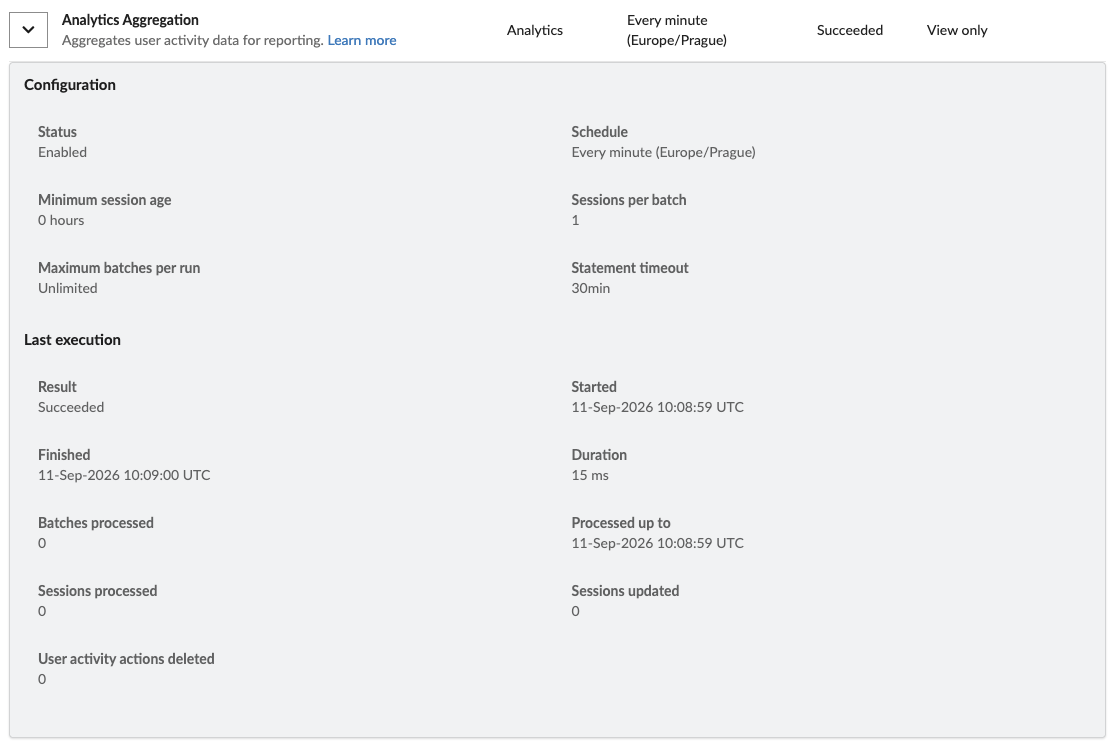
| Field | Meaning |
|---|---|
| Processed up to | Only user activity recorded before this time was eligible for aggregation. |
| Batches processed | Number of aggregation batches completed during the execution. |
| Sessions processed | Number of eligible sessions selected and processed in all completed batches. |
| Sessions updated | Number of session records updated with aggregated activity values. |
| User activity actions deleted | Number of redundant user activity records removed after their values were consolidated. |
A successful execution can report zero processed sessions. This means the job completed correctly but found no eligible user activity to aggregate.
The diagnostics endpoint also provides run history, execution status, duration, processed-record counts, and error details:
<instance>/rest/app/diag/jobs/analytics/uaa-aggregation
The diagnostics endpoint requires an authorized API request using the nw-auth request header. See Newired diagnostics API documentation.
Operational guidance
- Reduce sessions per batch or maximum batches per run if aggregation causes excessive database load.
- Move the schedule outside peak usage periods when large datasets are processed.
- Review the minimum session age if sessions are aggregated earlier or later than expected.
- If Portal reports the job as unavailable, verify that the Analytics Server is running and reachable.
For an overview of all jobs, see Maintenance jobs in Newired Portal.
Was this article helpful?
That’s Great!
Thank you for your feedback
Sorry! We couldn't be helpful
Thank you for your feedback
Feedback sent
We appreciate your effort and will try to fix the article