The Maintenance section in Newired Portal shows scheduled jobs that maintain published Content and Analytics data. Use it to review each job's schedule, availability, and latest execution.
Open Maintenance
- Open Administration in Newired Portal.
- Locate the Maintenance section.
- Select the arrow beside a job to view its configuration and latest execution details.
- Select Refresh to retrieve the latest information.
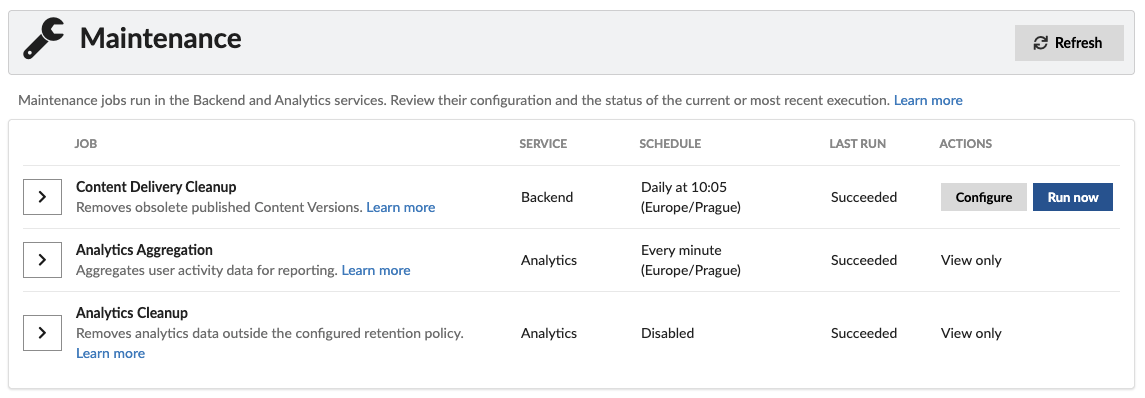
Information shown for each job
- Service identifies the Newired service that runs the job.
- Schedule shows when the job runs automatically. It also indicates when a job is disabled or unavailable.
- Last run shows the current or most recent execution result.
- Actions shows whether the job can be managed in the Portal or is available for viewing only.
Understand execution details
Expand a job to review its current or most recent execution. The following fields are common across maintenance jobs:
| Field | Meaning |
|---|---|
| Result or Status | Indicates whether the job has never run, is running, completed successfully, completed with errors, failed, or was skipped. |
| Started | Time when the execution started. |
| Finished | Time when the execution finished. |
| Duration | Total execution time. |
| Failure information | Details about an execution failure, when available. |
A dash indicates that no value was recorded. Each job also provides metrics specific to the work it performs; these are explained in the individual job guides below.
Maintenance jobs
Content Delivery Cleanup
Removes obsolete published Content Versions according to a retention policy. Administrators can configure its schedule and run it manually from the Portal.
Content Delivery Cleanup Job guide
Analytics Cleanup
Permanently removes Analytics records that are older than the configured retention period. Its configuration is managed on the Analytics Server.
Analytics Aggregation
Consolidates buffered user activity records into data used for Analytics reporting. Its configuration is managed on the Analytics Server.
User Activity Aggregation Job guide
Permissions and availability
Portal users who can access Administration can view maintenance information. Only administrators can configure or manually run Content Delivery Cleanup. Analytics jobs are shown as view only because they are configured on the Analytics Server.
If an Analytics job is marked Unavailable, verify that the Analytics Server is running and reachable, then select Refresh. Contact the person who manages your Newired environment if the information remains unavailable.
Was this article helpful?
That’s Great!
Thank you for your feedback
Sorry! We couldn't be helpful
Thank you for your feedback
Feedback sent
We appreciate your effort and will try to fix the article